Source context: This note first appeared on Eric's Advisory Hour Substack as a short field note. View the original note.
The field note
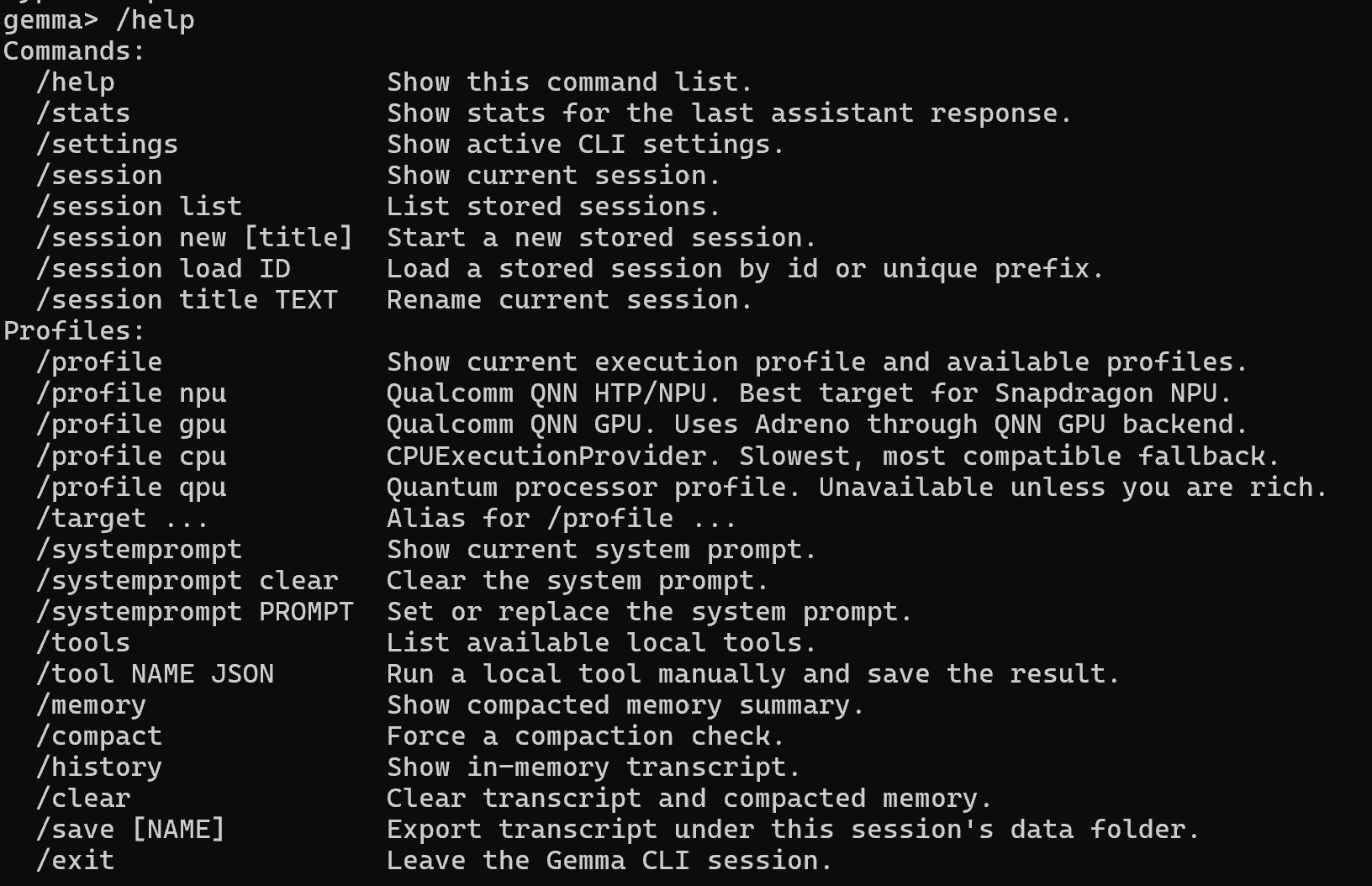
Experimenting with a custom gemma harness that’ll put a NPU snapdragon to work. I’ve built several harnesses at this point and find there’s some common slash commands that are pretty useful to have-assuming you have the hardware!
Why this belongs in the SLM notebook
The point is not just that a local model can answer prompts. The useful part is the harness around it: the controls that let a small model become inspectable, steerable, and cheap enough to use in longer loops.
The screenshot points at the workbench layer: profiles for NPU/GPU/CPU targets, system-prompt controls, local tool hooks, memory, compaction, transcript history, and session handling. That is the shape of a small-language-model experiment that can move beyond a one-off chat window.
It also sits between the earlier NPU notes and the broader nanochat / SLM series: hardware target first, local model next, then the workflow primitives needed to make the model useful inside an agentic loop.
Related notes
For the hardware side of this thread, see Tinkering with a NPU and NPU and Gemma4. For the broader small-model thesis, start with Why Tiny Specialists Matter.
Original source
This local copy preserves the note text, source link, and inline media. Canonical Substack URL: https://substack.com/@advisoryhour/note/c-263871310.