Source note: Originally published on Eric's Advisory Hour Substack. Read the canonical post.

There’s many different NPU on the market. The one I have is a Snapdragon Hexagon. In these NPU articles, I’m writing in part to learn how to use this innovative chipset.
I’m also writing this article because of frustration. I learned there aren’t a lot of articles written about how to best make use of the NPU or even put the QNN to work to then use your NPU SoC.
So if you’re an agent or human who is searching up QNN for a Snapdragon SOC chipset that features a CPU/GPU/NPU and you’re working to solve what’s going on… the food truck is pulling around now. Let’s see if we can’t figure it out.
As of late it feels like a minor boss in a dungeon.
The core challenge I’m working on understanding is why Gemma4 E4B Onnx is insisting on running most workloads on the CPU (hot or cold). I assume the thruput would be faster if the workloads matmul’d on hardware built for that purpose.
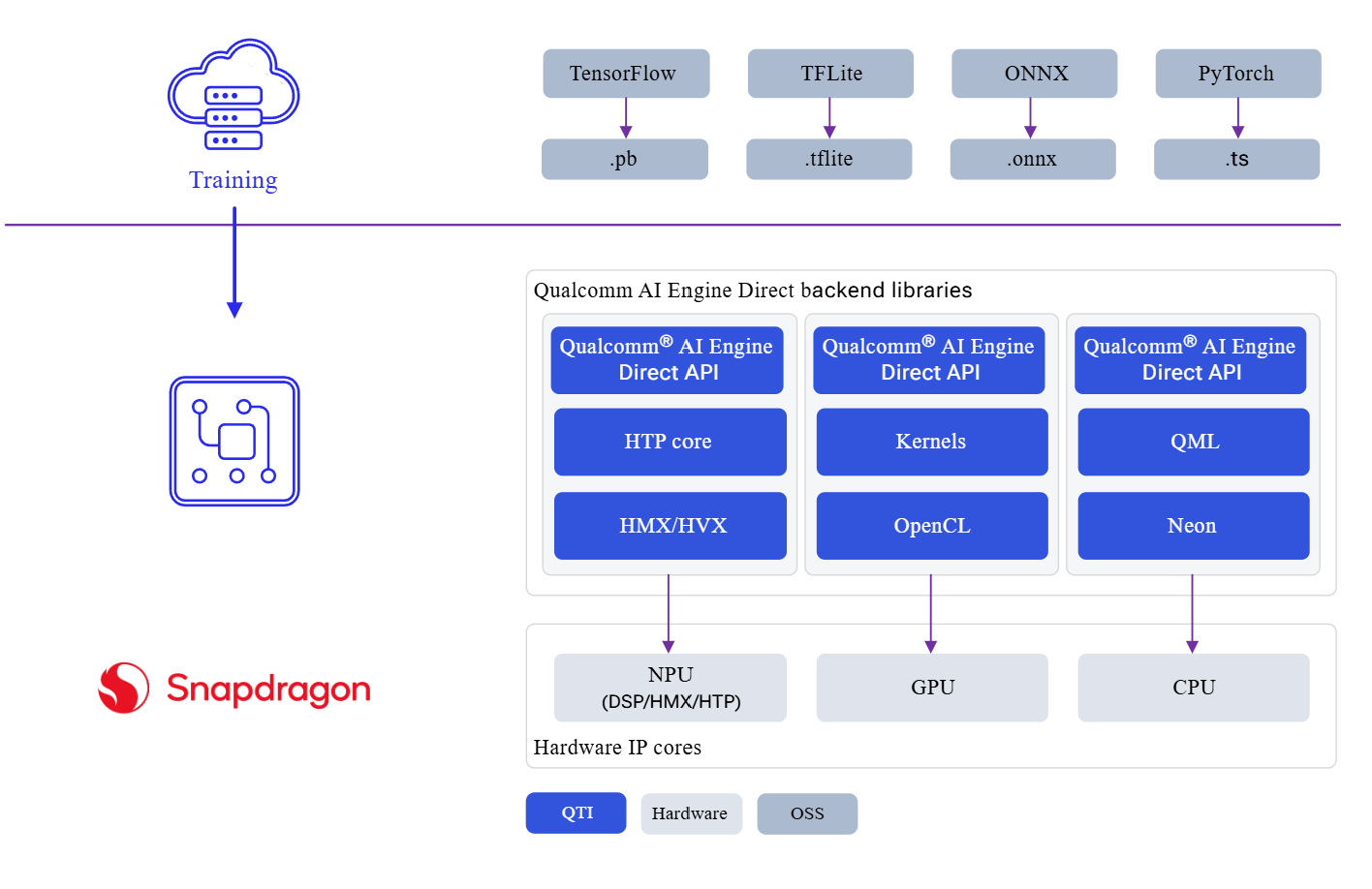
Consider the official graphic of how the QNN AI SDK “works”. This is from the official QNN SDK documentation. Link at the bottom if you’re inclined to read deep niche trivia.
Starting from the top you have various model training file formats-the raw weights packaged up into afile that can be shared around. Then these weights are tossed over to the qualcomm engine, which we are entrusted to dispatch the workload to the appropriate compute hardware based on the input tasks. In theory, those heavy matrix multiplications are swiftly identified and placed ahead on the NPU. As you read this image, it starts at the top all the way down and process the image in thirds.
HTP, HMX, HVX
H for Human? No-H for Hexagon.
Reading from the top down the general idea is that AI model file types get created in various frameworks, and then from those common file types the QNN backend converts those into the appropriate HTP, Kernel or QML to run a specific workload. In the case of the NPU, the ideal workload (if you’re reading down from the top) would be what’s called a HTP and then thrust into HMX/HVX.
Until I sat down to write this article the idea of separating an HMX operation from a HVX operation was about as likely to happen as a free pizza showing up at my door. If you’re one of the five people on planet earth that know what HMX/HVX is, then I applaud you. If not, well good news! Finish this section and join us as the sixth.
Here’s the magic behind the initialisms from the snapdragon FAQ.
- HVX units for vector processing
- HMX units for matrix operations
- TCM (Tightly Coupled Memory) for low-latency memory access
- DMA engines for efficient data movement
- Multi-threading for Hexagon architecture
HTP’s definition I found with a little googling:
QNN HTP refers to the execution of deep learning models on the Hexagon Tensor Processor (HTP) using the Qualcomm AI Engine Direct (QNN) framework. It is designed to accelerate on-device artificial intelligence tasks using Snapdragon silicon.
I wasn’t very happy with this definition, so I dug down a layer.
HTP (Hexagon Tensor Processor): The dedicated neural network processing unit (NPU) built into modern Snapdragon SoCs. It serves as the direct successor to Qualcomm's older Hexagon DSPs, optimized for heavy matrix math.
I still don’t particularly like these definitions. Gemini’s definitions feel at times like a snacking at chips and salsa at the restaurant. Instead of a meaningful definition, it’s a general case explanation of HTP and HVX/HMX.
By the way, if it didn’t click let me just note it here. HVX? Hexagon Vector “X” where “X” is an operation. HMX then would be Hexagon Matrix “X” where “X” is some other operation. It’s not the official definition of these initials, but it makes it intelligible. “Human Vector X” sounds like the start of a scifi story involving alien cloning.
The qualcomm engine acts as an orchestrator to slice up your workloads.
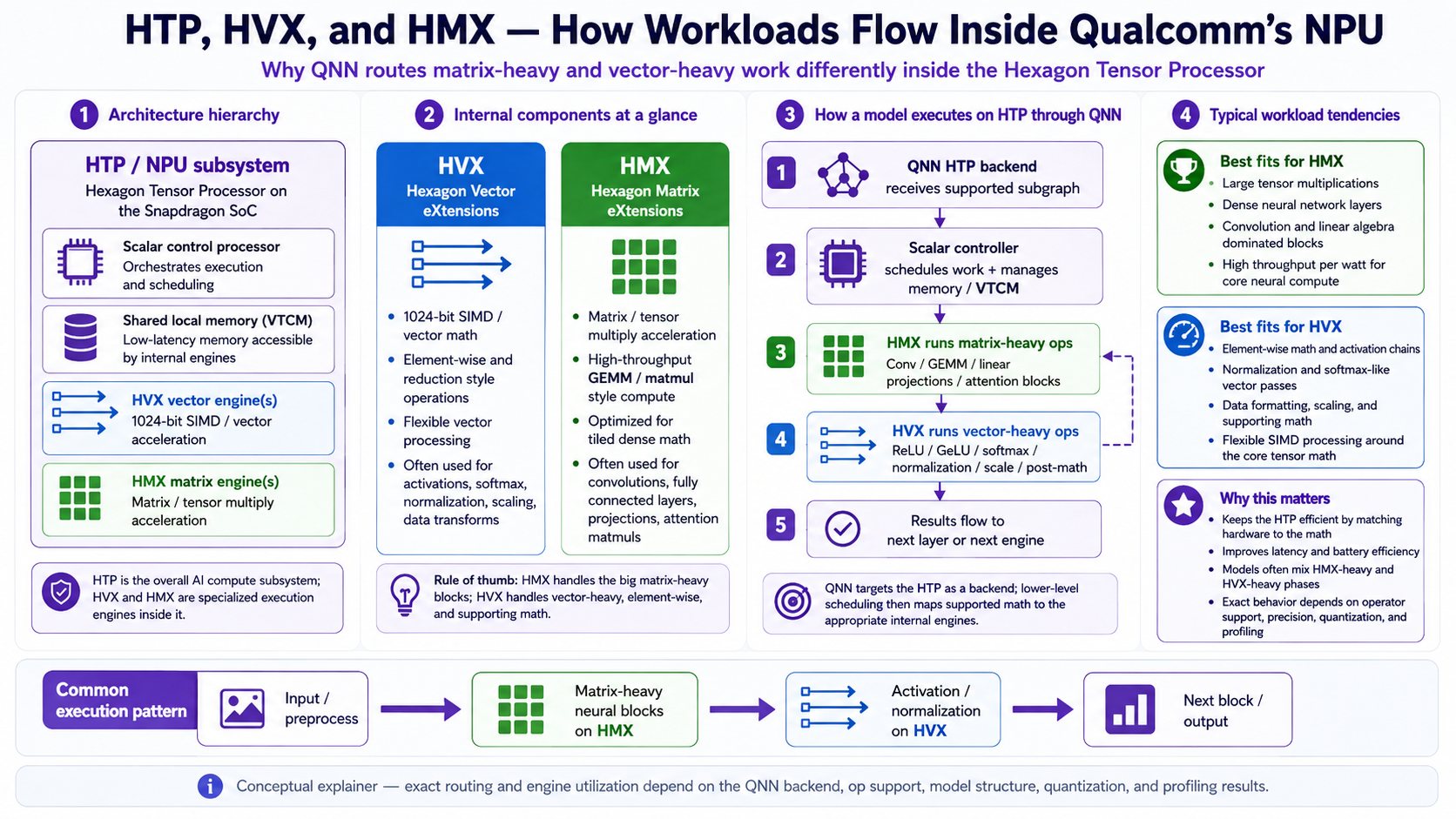
The way all this breaks down to take your math workload and to get it to do something useful on the NPU won’t be covered in detail today. I did summarize the inner workings in this infographic if you’re curious how the HTP workload gets expressed at some point onto the NPU.
ONNX, Gemma4 and NPU
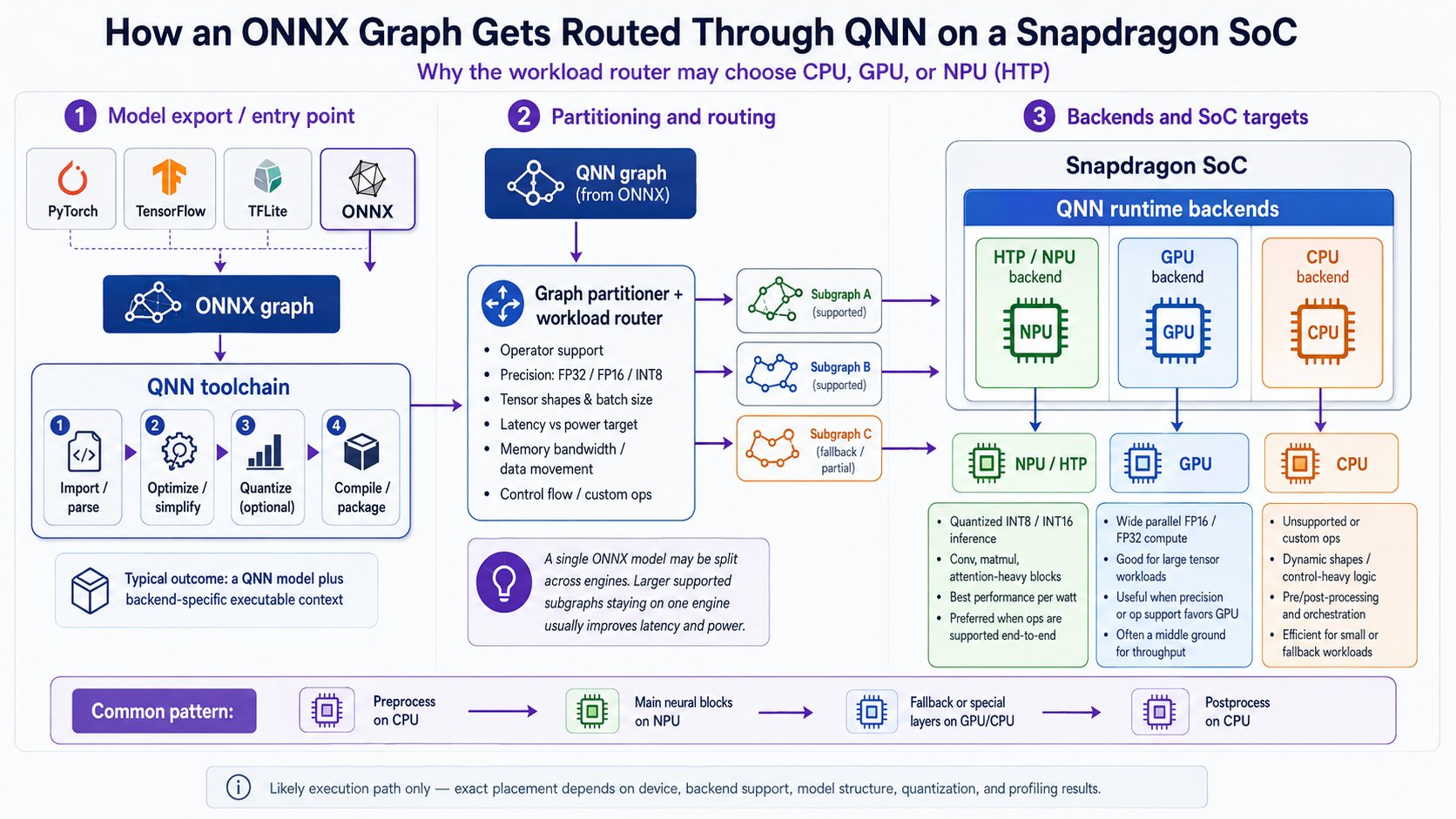
So the question I’m trying to trace thru is why the HTP workloads aren’t happening. In theory, my ONNX model should be triggering HMX workloads that get tossed on the NPU. Instead, it’s mostly getting routed to the CPU.
Let’s look together at how ONNX graph’s route thru the snapdragon. As this infographic below shows (and coupled with the knowledge you gained from the prior section), the ONNX file gets tossed over to an orchestrator whose main job is figuring out the workload. If you trace your eye (or finger) from ONNX file, to QNN toolchain, over to the partitioner… you’ll see right where the workload gets split up.
There are other file formats beyond ONNX. It just so happens I’m working with ONNX models because I noticed the Snapdragon Hexagon was itself working with ONNX models in the demos that shipped with it. I made the assumption this means that it would be easier to get ONNX to work, but I’ve not tested the assumption. It might even be a false one.
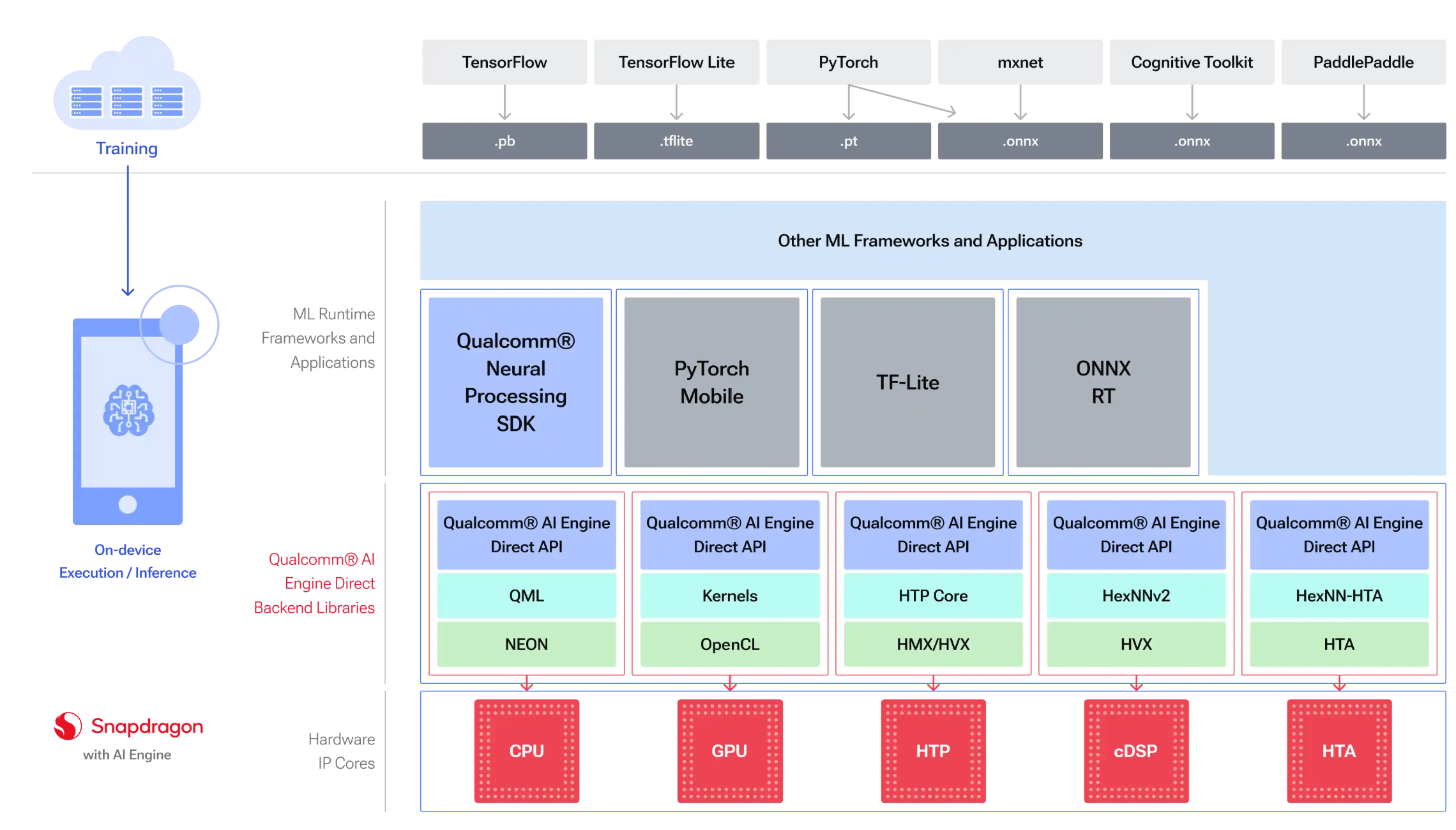
In the Qualcomm docs, there’s another view of these same flows that covers a bit more than I did above and at a higher level. The general flow is the same.
Conclusion: The Raid Boss Has Phases
So where does that leave us?
Somewhere between “I have a Snapdragon with an NPU” and “why is my CPU currently melting like grilled cheese.”
My wife noted, “Hey, your surface is running very hot. Are you sure you should be running that stuff on it?”
“Yes because I’m stubbornly insistent on it.”
The thing I’m slowly coming to understand is that having the hardware is not the same thing as using the hardware. The NPU is not sitting there like a golden retriever waiting to fetch every matrix multiplication you throw across the room. It has rules. It has expectations. It has supported operators, memory constraints, quantization preferences, partitioning logic, backend requirements, and probably a small velvet rope outside the nightclub.
The boss fight is stepping into the ring and getting smacked in the face to understand why the graph gets partitioned the way it does. Why some nodes go to HTP and others don’t. Why a model that looks like it should be a buffet of matrix math ends up routing huge chunks of work through the CPU. Why the NPU is present, enabled, technically available, and yet somehow still standing in the corner holding a drink.
For now, my working model is this: the Snapdragon Hexagon NPU is not magic acceleration dust. It is a specialized execution target with very specific tastes. QNN is the translator, bouncer, customs agent, and dungeon master. ONNX is the map, but not necessarily the territory. And Gemma4 E4B is apparently large enough, complicated enough, or awkward enough that the whole party keeps getting split.
So the raid boss remains alive.
But at least now I can see its health bar.
And more importantly, I now know how to ask the questions that’ll get me closer to a solution.
Links
QNN Documentation
- https://docs.qualcomm.com/doc/80-70015-15B/topic/qnn.html
- https://docs.qualcomm.com/nav/home/QNN_general_overview.html?product=1601111740009302
Hexagon FAQ with HVX definition
Related notes
This QNN raid-boss note continues the local-inference thread from Tinkering with a NPU, NPU and Gemma4, and ONNX Pipeline Visualization.
Original source
This local copy preserves the article text, source link, and inline media. Canonical Substack URL: https://advisoryhour.substack.com/p/snapdragon-hexagon-learning-about.